![Ramp_Logo_Saphire-Nov-06-2023-11-33-51-7748-PM.png]](https://support.ramprfid.com/hs-fs/hubfs/Ramp_Logo_Saphire-Nov-06-2023-11-33-51-7748-PM.png?height=39&name=Ramp_Logo_Saphire-Nov-06-2023-11-33-51-7748-PM.png)
Supported Models
-
SATO CLNX Series RFID Printers (e.g., CL4NX, CL6NX)
Prerequisites
Verify the following before proceeding:
-
SATO CLNX-series RFID printer
-
Compatible replacement label roll
For supported media specifications, contact support@ramp.com.au.
Procedure
Removing the Used Label Roll
-
Open the top cover.

- Move the head lock lever toward the rear to open the print head.

- Pull the media holder guide and media guide away from the product.
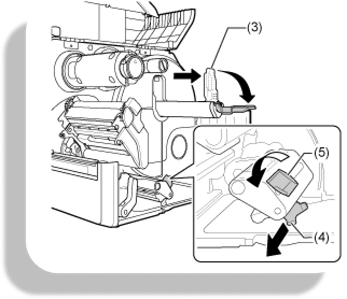
- Turn the media guide knob counterclockwise to release the media guide.
- Remove the spent label roll from the media holder.
Installing the New Label Roll
- Place the replacement label roll into the media holder. Ensure the roll is seated fully toward the interior of the printer.
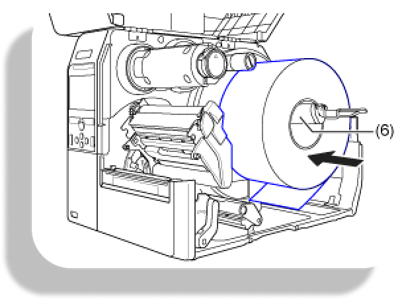
- Push the media holder guide lightly against the label roll.
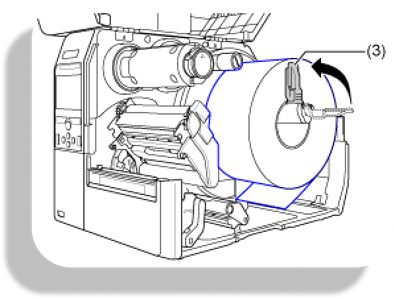
- Route the media under the media damper and media sensor guide, feeding it into the printer.
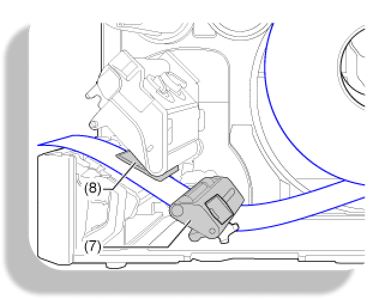
- Lower the print head until the head lock lever engages.
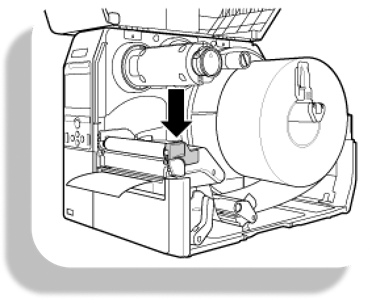
- Press the media guide lightly against the end of the media and turn the knob clockwise to lock the media guide.

- Close the top cover.
Media Calibration
After loading a new label roll or changing label dimensions, perform media calibration so that the printer detects label gaps and I-Marks correctly.
-
Remove several labels from the start of the roll to expose the label liner.
-
Feed the exposed liner under the print head.
-
On the printer control panel, open Menu → Settings → Printing → Advanced.
-
Select Calibrate.
-
Select Auto-Calibration.
-
Select Gap + I-Mark.
-
Allow the calibration process to complete.
After calibration is complete, the printer is ready for normal operation.
⚠️ If the media label type is different and RFID printing is required, adjustments to the RFID settings are also required to ensure correct RFID encoding.