![Ramp_Logo_Saphire-Nov-06-2023-11-33-51-7748-PM.png]](https://support.ramprfid.com/hs-fs/hubfs/Ramp_Logo_Saphire-Nov-06-2023-11-33-51-7748-PM.png?height=39&name=Ramp_Logo_Saphire-Nov-06-2023-11-33-51-7748-PM.png)
Supported Models
-
SATO CLNX Series RFID Printers (including CL4NX and CL6NX)
Prerequisites
Verify the following before proceeding:
-
SATO CLNX-series RFID printer
-
Compatible replacement thermal ribbon
- Additional ribbon can be purchased from local suppliers such as Peacock Bros.
For supported ribbon specifications, contact support@ramp.com.au.
Procedure
Removing the Used Ribbon
-
Open the top cover.
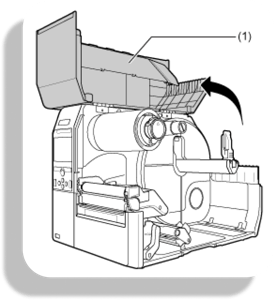
-
Move the head lock lever toward the rear to open the print head.
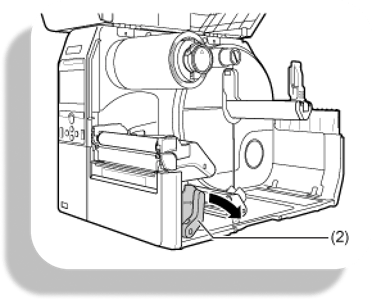
-
Press the release tab on the ribbon rewind spindle. Remove the rewind spindle from the printer.
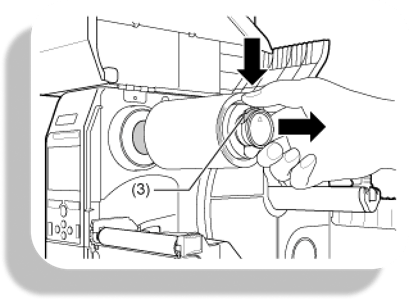
-
Remove the used ribbon from the rewind spindle.
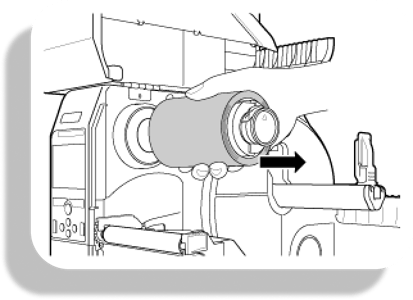
-
Reinsert the empty rewind spindle into the printer.
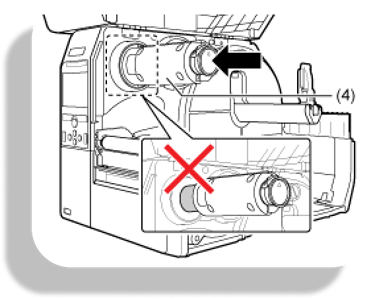
Installing the New Ribbon
-
Install the replacement ribbon onto the ribbon supply spindle.
-
Verify that the matte side of the ribbon faces downward toward the print surface.
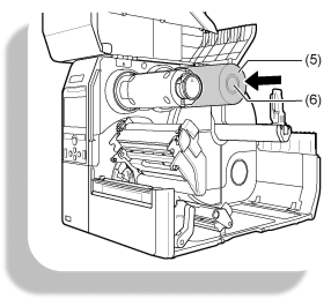
-
-
Route the ribbon under the print head.
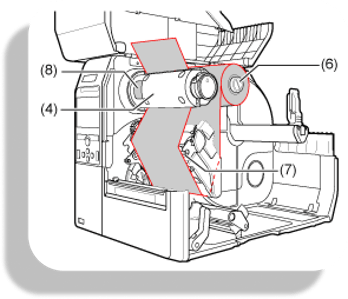
-
Verify that the ribbon lies flat and free of wrinkles.
-
Attach the ribbon to the rewind spindle and grip sheet.
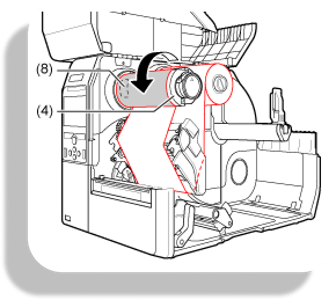
-
Rotate the rewind spindle counterclockwise to tension the ribbon.
-
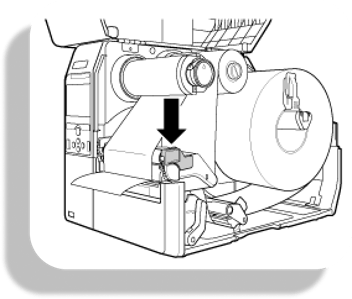
Lower the print head until the head lock lever engages.
-
Close the top cover.
Troubleshooting
Low Print Quality After Ribbon Replacement
If print quality is degraded after replacement:
-
Verify that the ribbon is flat and free of wrinkles.
-
Verify that the matte side of the ribbon faces the print surface.
-
Reinstall the ribbon if misalignment is observed.
- Verify that the ribbon is new and not exposed to the sun.
If issues persist, refer to Print Quality Issues (SATO CL4NX) or contact support@ramp.com.au.