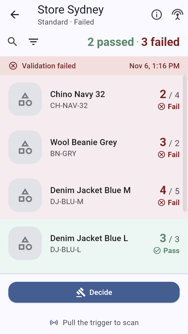
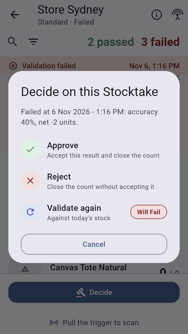
Some organisations need a place manager to approve every count, even one that passes. A place manager can also decide on a count that failed validation, instead of sending it back for a recount.
Before you decide on a failed count, check its result line by line. See How to Complete a Stocktake.
What You Need
- To be a manager of the place.
- A count that has been completed. Staff who aren't managers see Waiting for approval, and there is nothing more for them to do.
Find a Stocktake Awaiting Approval
A place manager sees Validation passed (or Validation failed) and a Decide button.
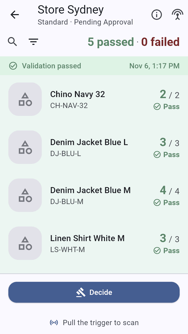
Approve a Stocktake
Approving accepts the count as it is and closes it.
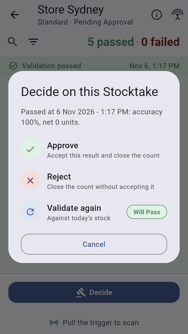
Tap Decide.
Tap Approve.
Enter a comment. A comment is required.
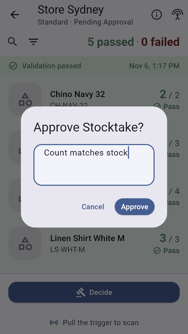
Tap Approve. Stocktake approved shows.
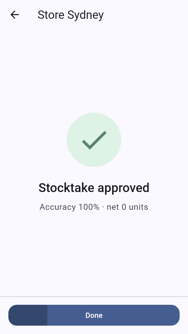
Tap Done.
Reject a Stocktake
Rejecting closes the count without accepting it.
Tap Decide.
Tap Reject.
Enter a comment. A comment is required.
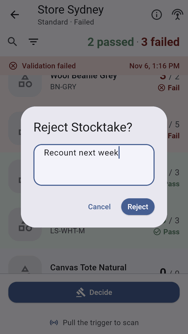
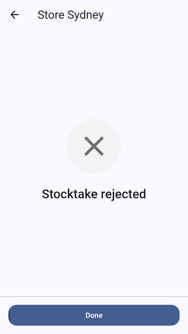
Tap Reject. Stocktake rejected shows, and the place is free for a new count.