![Ramp_Logo_Saphire-Nov-06-2023-11-33-51-7748-PM.png]](https://support.ramprfid.com/hs-fs/hubfs/Ramp_Logo_Saphire-Nov-06-2023-11-33-51-7748-PM.png?height=39&name=Ramp_Logo_Saphire-Nov-06-2023-11-33-51-7748-PM.png)
Observed Behaviour
The following behaviour may indicate a print quality issue:
-
Printed output appears too dark
-
Printed output appears too light
-
Print is streaked, faded, or inconsistent
-
Uneven print density across the label
Resolution
Verifying Media and Ribbon Installation
Media and ribbon configuration affects print output quality. Verify that the media and thermal ribbon are loaded correctly.
For installation procedures, refer to the following articles:
After confirming correct installation, proceed with configuration adjustments.
Adjusting Print Speed
Print speed affects heat application during printing. A slower print speed generally produces higher-quality output by allowing more consistent heat transfer.
-
-
Press the Menu button to open the Settings menu.
-
Use the navigation buttons to select Printing, then press Enter.
-
Select Speed, then press Enter.
-
Select the required speed value.
- Press the Offline button to switch the printer to Offline mode.
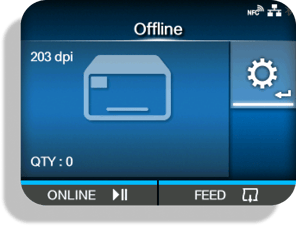
- Press the Menu button
 to show the Settings menu.
 - Use the navigation buttons
 to select Printing, and then press Enter .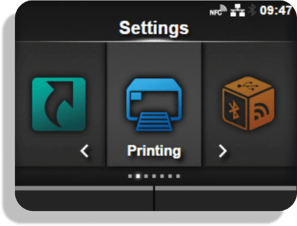
- Use the navigation buttons to select Speed, and then press Enter .
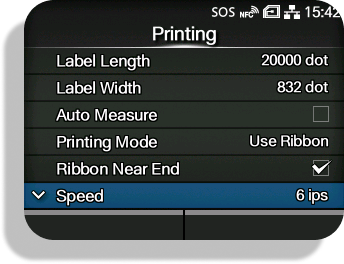
- Select the required speed value.
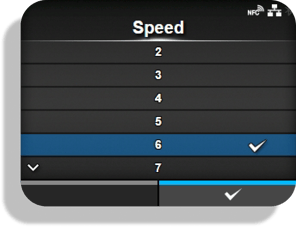
✅ A print speed of 2 is recommended for best printing results
Adjusting Print Darkness
Print darkness controls heat intensity applied to the media.
-
Press the Offline button to switch the printer to Offline mode.
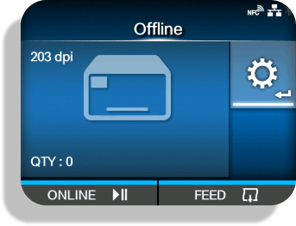
- Press the button to show the [Settings] menu.
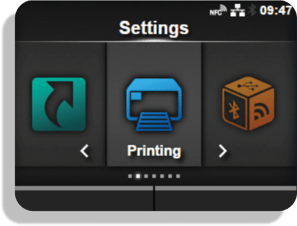
- Use the navigation buttons to select Printing, then press Enter .
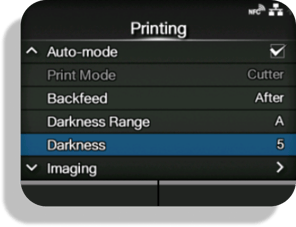
- Use the navigation buttons to select Darkness, and then press Enter .
- Select a value between 1 (lightest) and 10 (darkest).
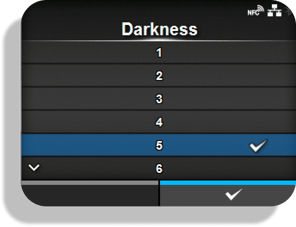
- Press the
 button or button to save the setting.
Adjusting Print Head Pressure
Print head pressure affects consistency across the label width.
-
Open the top cover of the product.
- Locate the pressure adjustment dials on the print head assembly.
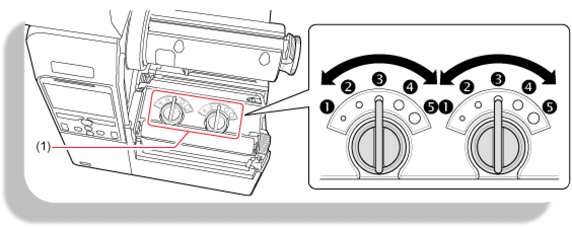
- Adjust the dials to balance pressure across the media width.
Perform a test print after each adjustment.
Cleaning the Print Head
Print head contamination can affect print clarity and consistency.
Clean the print head using approved cleaning procedures.
For detailed instructions, refer to the SATO CL4NX Print Head Cleaning video.